🔒 Beta pricing is closing.  Once the beta fills, $29 moves to $97 — permanently.
Built on 300,000+ meals of real-world planning

"What's for Dinner?" Solved.

10 minutes on Sunday. Dinner decided for the whole week.

One-time payment · Lifetime access · 7-day refund
A short tour of the weekly flow.
10 minutes on Sunday.  Dinner decided for the whole week.
How this started

I planned meals for 200 sailors. Half a million dollars in groceries. 300,000+ meals.

Steven, founder of Meal Planning OS

On a ship, you can't stop at a grocery store when you run low. You learn fast when winging it isn't an option.

When I got home, I figured feeding one person in a fully stocked kitchen would be easy.

It wasn't.

Because at sea, the decision was already made. At home, every night at 6pm — after you've already solved a hundred problems — the question hits again.

"What's for dinner?"

So you order out. Again.

I took the same system I used at sea and rebuilt it for real life. That's Meal Planning OS.

300k+
Meals planned & executed
$500k
In groceries managed
10 min
To plan your whole week
What it actually is

Meal Planning OS is a web app.

No app store. No phone install. Just open the website and log in from any device — phone, laptop, tablet. Your data syncs across all of them.

Your plan, your recipes, and your grocery list all live in one place.

  • It's not a course, a PDF, or a meal kit.
  • It's a simple planning tool you use once a week — for 10 minutes.
  • At the grocery store, your list is already in your pocket — sorted by section.
  • At dinner time, you pull up the recipe on any screen. No cookbook, no scrolling.
  • Your partner or spouse can log in with the same account.
  • Their grocery list updates in real time when you make changes. No more "did you add milk?" texts.
See it in action

Three steps. Ten minutes. Done for the week.

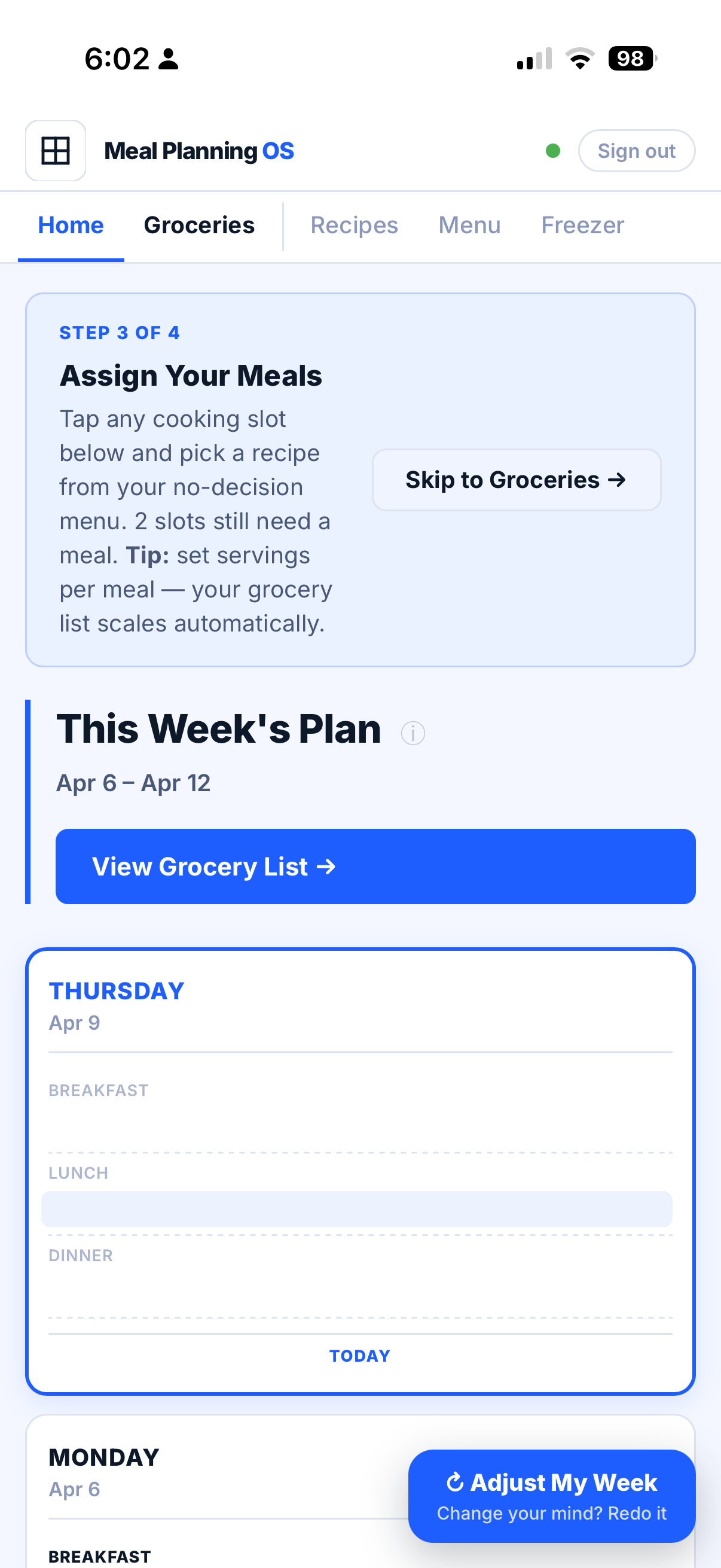
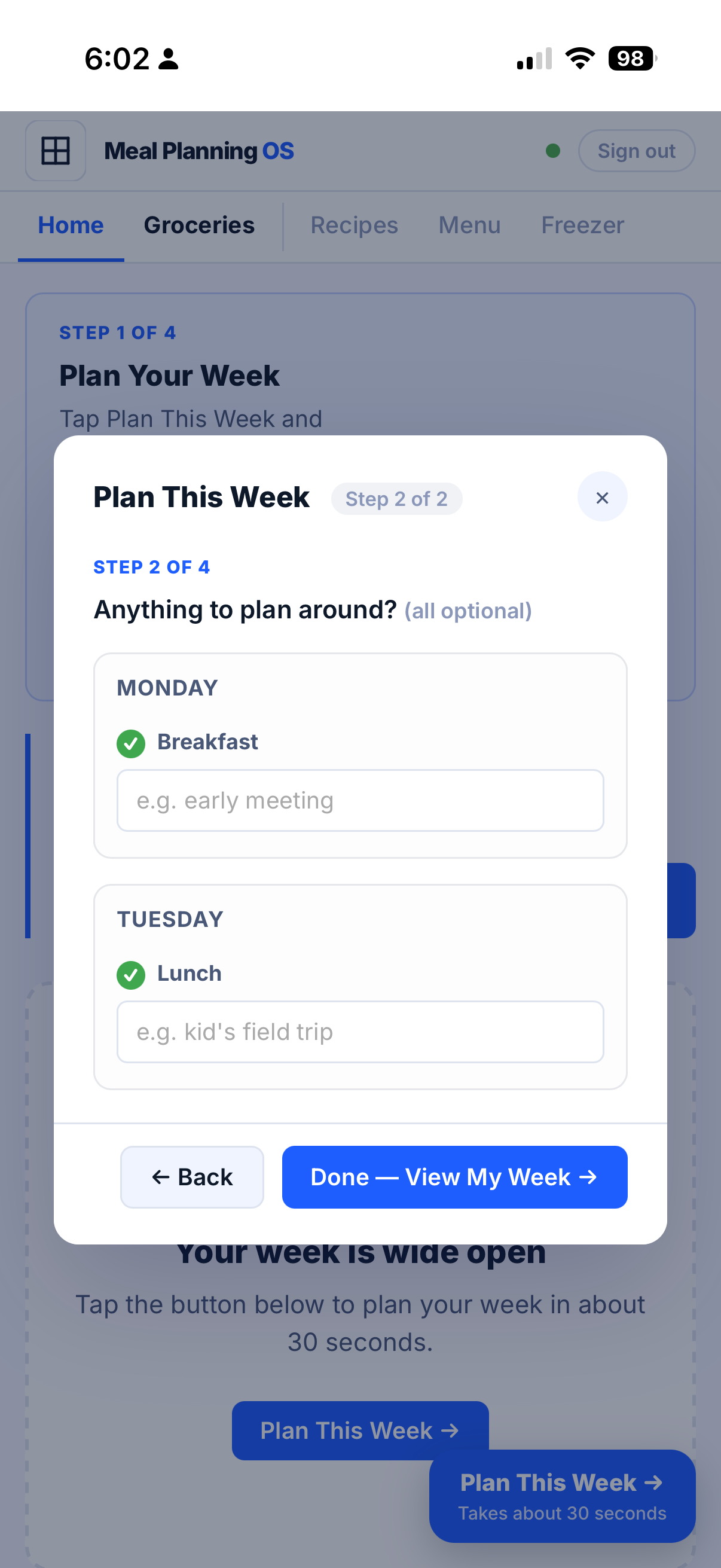
Step 1

Plan your week.

Log your commitments for each day — late meeting Monday, gym Tuesday, family dinner Thursday.

The app puts them right on your meal plan, so you're planning around your real life — not a fantasy version of it.

Weekends are optional. Plan them if you want structure, leave them open if you'd rather play it by ear. The real work is Monday–Friday.

Step 1 — Plan Your Week
Step 2

Assign meals to your week.

Drop into a Monday–Sunday meal grid. Drop in a recipe from your library — or plug in leftovers, planned takeout, an eating-out night, or a freezer meal you already batch-cooked.

Takes about 3 minutes once your menu is built.

Step 2 — Assign Meals
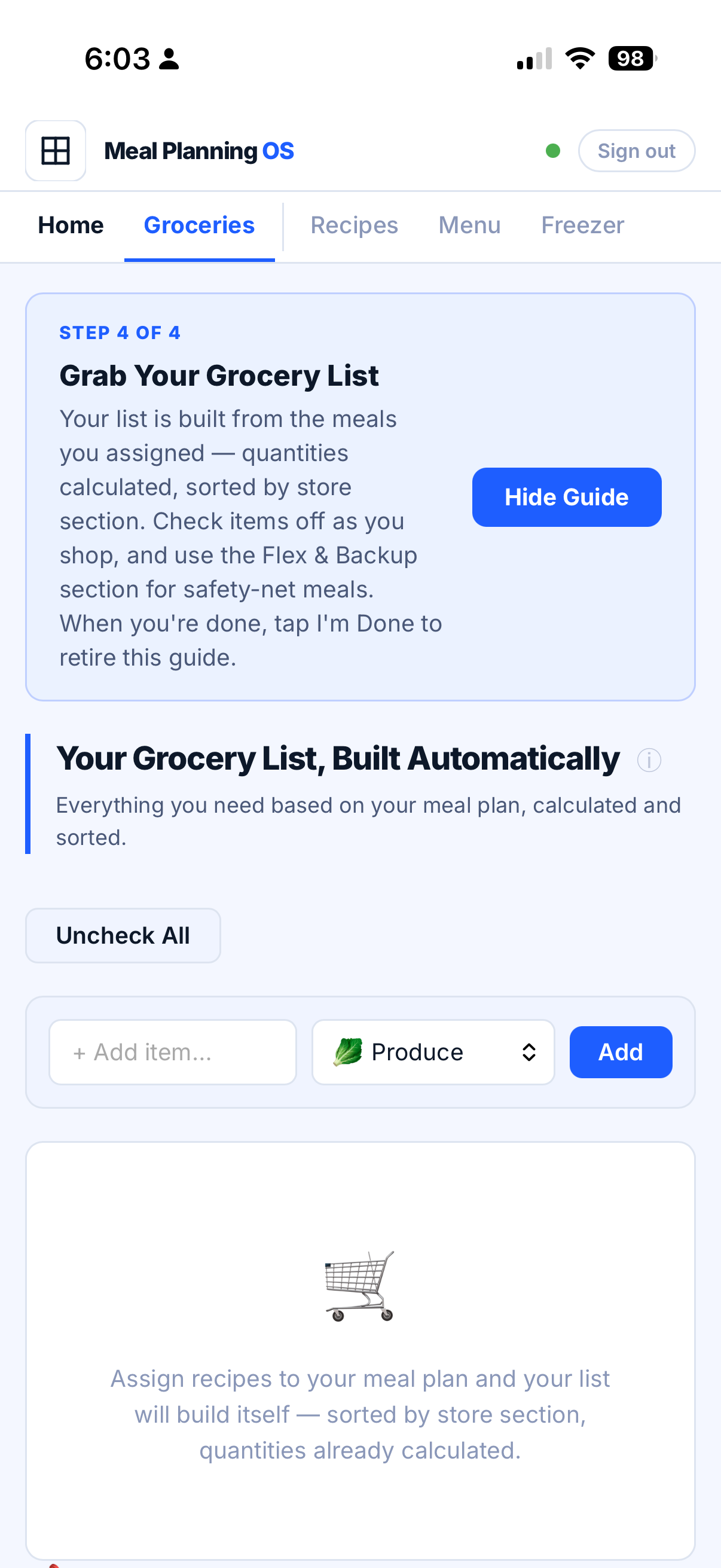
Step 3

Your grocery list builds itself.

Every ingredient, across every meal, already scaled to your serving size — sorted by store section. Produce. Protein. Pantry. Etc.

This tool pays for itself the first time you skip the takeout.

Step 3 — Grocery List Builds Itself
First-time setup

Do this once. Use it every week forever.

You load your personal recipe library and build your No-Decision Menu one time. The whole setup takes under 10 minutes. After that, weekly planning is about 10 minutes on Sunday.

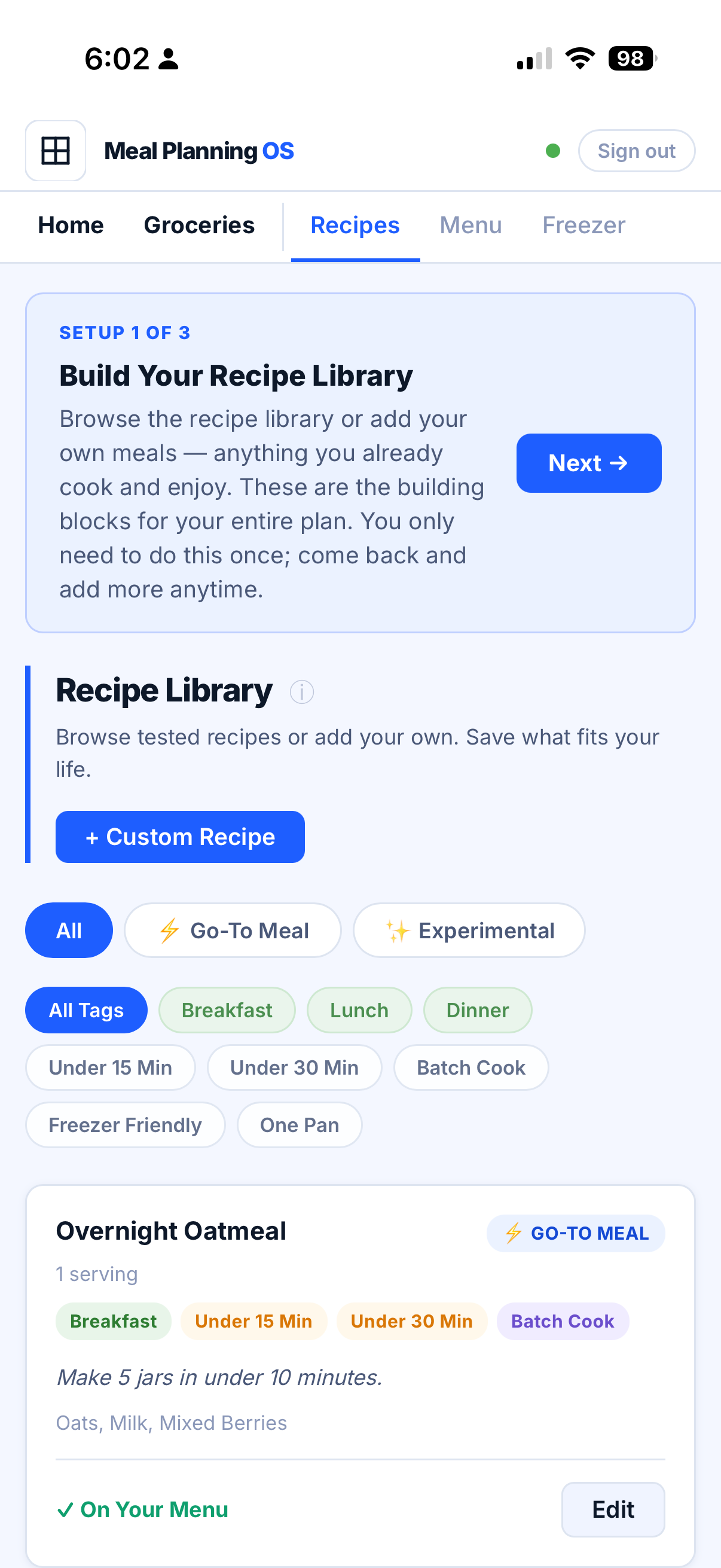
Setup 1 — Recipe Library
Setup 1 of 3

Select your recipes.

Paste any recipe URL to auto-import it, or add your own from scratch. A library of tested recipes comes loaded, with new ones added monthly.

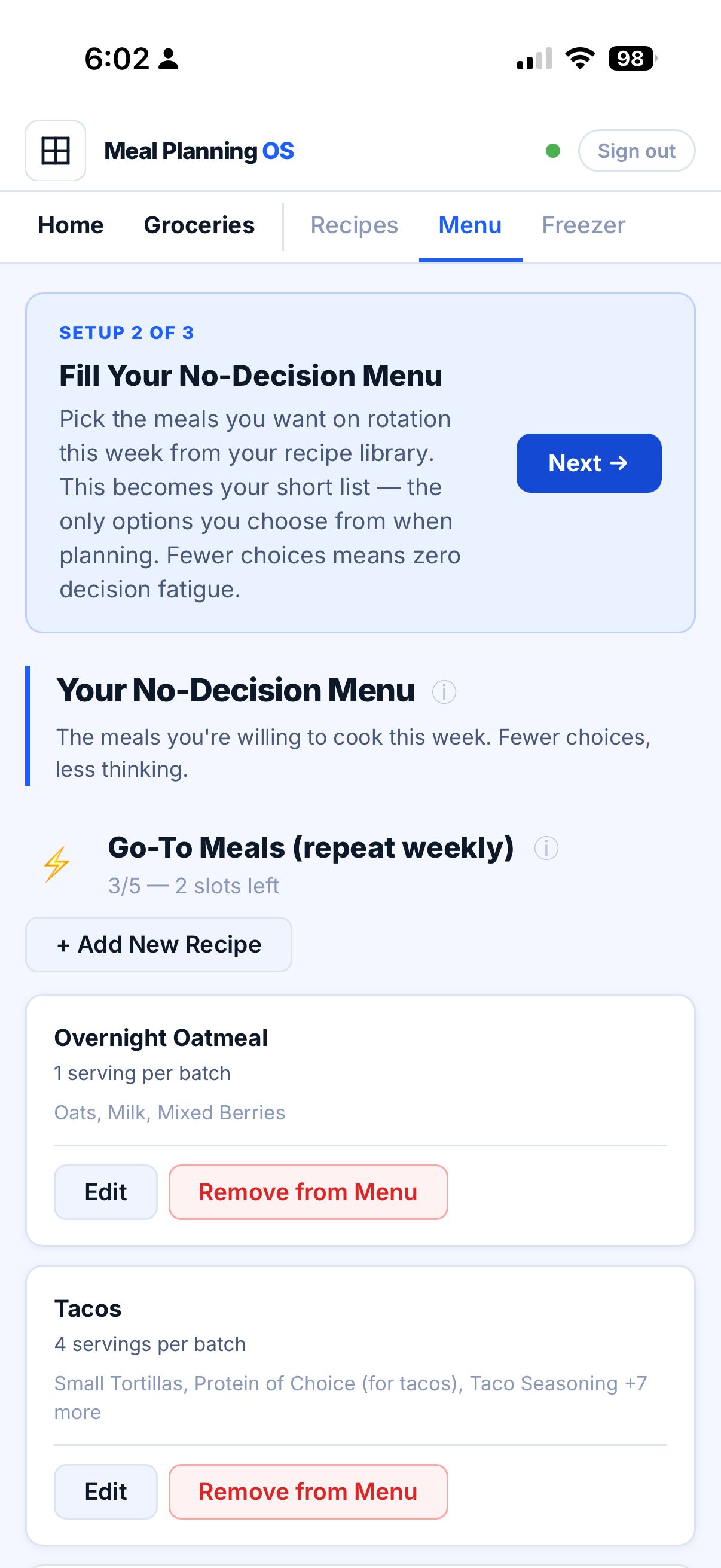
Setup 2 — No-Decision Menu
Setup 2 of 3

Build your No-Decision Menu.

Pick up to 5 Go-To recipes (reliable, no-brainer meals you could cook half-asleep) and up to 5 Experimental ones. Each category caps at 5 max on purpose. To reduce decisions.

Setup 3 — Freezer Inventory
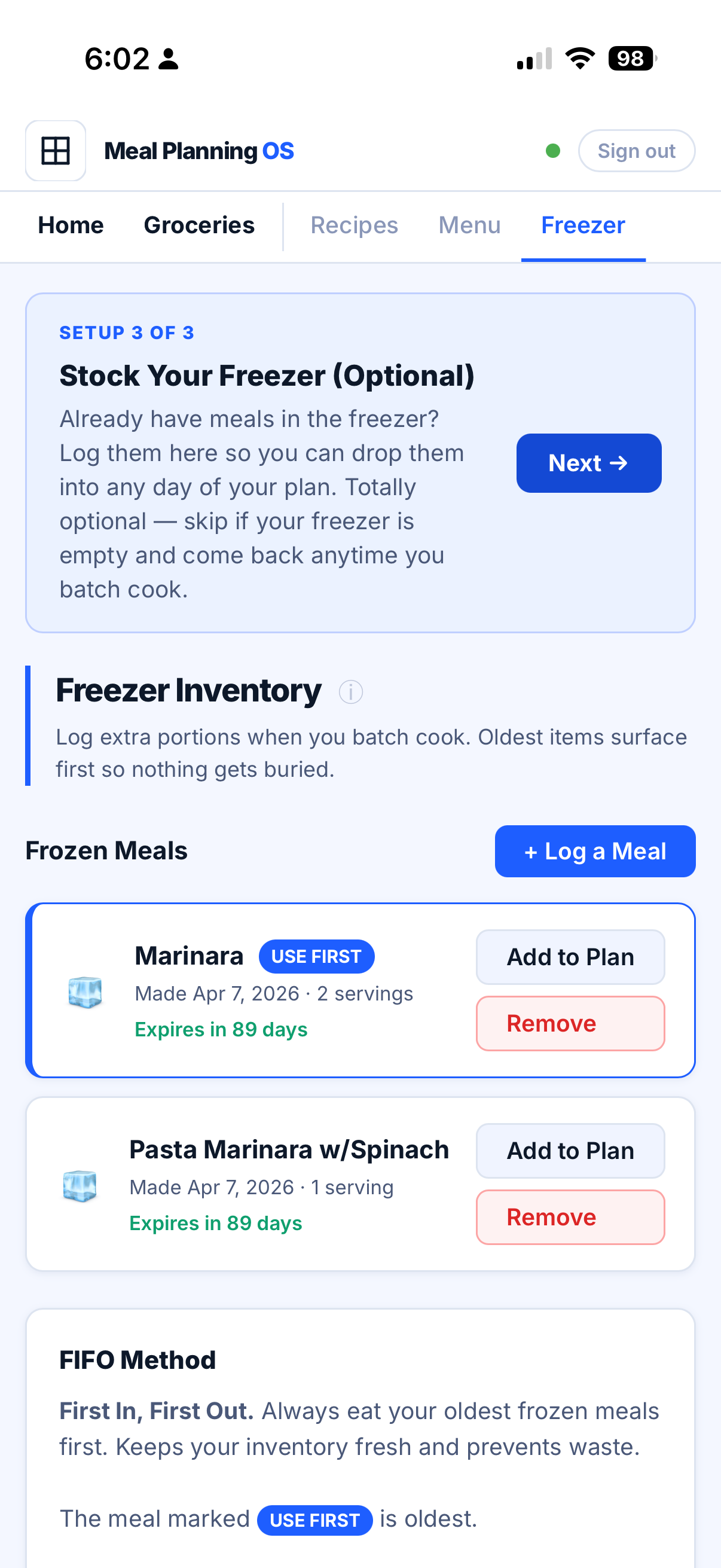
Setup 3 of 3

Stock your freezer (optional).

Already have meals in the freezer? Log them once so you can drop them into any day of your plan. Skip if your freezer is empty — come back anytime you batch cook.

Who this is for

Be honest with yourself.

This is for you if any of these hit close:

  • Busy weeks mean food is always the last thing figured out
  • Tried meal planning before and quit because it felt like a second job
  • Spending more on takeout than you want to admit
  • Know eating better would change everything, but can't make it stick
  • Done with recipe apps and subscription boxes — and want a system that just works

Close this page if any of these sound like you:

  • Cooking is a creative hobby — the browsing, experimenting, and improvising is the enjoyable part
  • A meal kit with ingredients shipped to the door is what you're after
  • You want a calorie tracker so you can eat recipes with the perfect macros

Meal Planning OS does one thing — makes sure the decision is already made before the week starts, so you can focus on what actually matters.

Why not just use Excel / Notes / whatever

I tried all of it.

  • Google Sheets
  • Notes app
  • Whiteboard on the fridge

They work for about 10 days and then fall apart the moment life gets busy — which is exactly when you need a system the most.

Meal Planning OS keeps your recipes, your plan, your grocery list, and your freezer inventory in one place, all synced, all automatically calculated.

10 minutes. Saves you hours all week.

What users are saying

The system works. Here's what people say after using it.

The price

$29. One time. Yours forever.

That's the beta price. It won't last long. Once the beta fills, the price moves to $97 permanently.

Beta Access
$97$29
one-time payment · lifetime access
⚡ Limited beta spots — price jumps to $97 when filled

What you're getting at this price:

  • Lifetime access to Meal Planning OS, built from 300,000+ meals of real-world planning
  • A direct line to me while it's still being shaped — beta users have real influence over what gets built next
  • A library of tested recipes pre-loaded, with new recipes added monthly
  • One-click recipe URL import
  • No-Decision Menu + weekly meal grid
  • Auto-generated, store-section-sorted grocery list
  • Freezer inventory with "use first" flags
  • No subscription · No monthly charge to forget · No price increase, ever, for you
Get Access Now — $29
The guarantee. Not sure it'll stick? Try it for a full week. If it's not for you, email me within 7 days and I'll refund you — no questions asked.
Questions

Things people ask before buying.

Is this an app I have to install?

No. It's a web app. Open the website, log in from any device — phone, laptop, tablet. Nothing to download.

Is this a recipe app?

Not really. A library of tested recipes comes loaded (with new ones added monthly) and you can import any recipe URL in one click, but the real product is the system that turns those recipes into a decided week. The win isn't "find me a recipe" — it's "the decision is already made."

How long does setup take?

Under 10 minutes. Load your recipes, pick your No-Decision Menu, optionally log the freezer. After that, weekly planning is about 10 minutes on Sunday.

Can my partner / spouse use it too?

Yes. Share the login. Their grocery list updates in real time when you make changes. No more "did you add milk?" texts.

Is there a subscription?

No. $29, one time, lifetime access. No monthly charge. No price increase for you, ever.

What happens after the beta?

Once the beta fills, new access moves to $97 permanently. Everyone who bought at $29 keeps their access and all future updates.

What if it doesn't work for me?

Try it for a full week. If it's not for you, email me within 7 days and I'll refund you. No questions asked.

Who built this?

Steven — a former U.S. Coast Guard culinary specialist who planned and executed 300,000+ meals and managed over half a million dollars in groceries for ships at sea, where there's no running to the store when you run out. Meal Planning OS is that playbook, shrunk to fit your week.

"What's for Dinner?" Solved.

Stop burning willpower on a decision you make 365 nights a year. Lock in $29 before the price moves to $97.

Get Access Now — $29
One-time · Lifetime access · 7-day refund
P.S. The grocery list alone has saved people more than $29 in one week of skipped takeout. Just saying.